Anim4Bot

Robotic and DIY

  • Hexapod Robot
    • Animabot Rev3
      • Mecha
      • Hardware
      • Software
    • Animabot Rev2
    • Animabot Rev1
  • 3 axis CNC
  • Raspberry Pi
  • Robotic Team
  • SolidWorks
  • 3D Printer
  • Software
    • Image Processing
  • Contact

Animabot Rev2 – Electronic Boards

Posted by Emmanuel Sichet on 26/08/2014
Posted in: Animabot Rev2. Tagged: Animabot, design, electronic, hexapod. Leave a comment

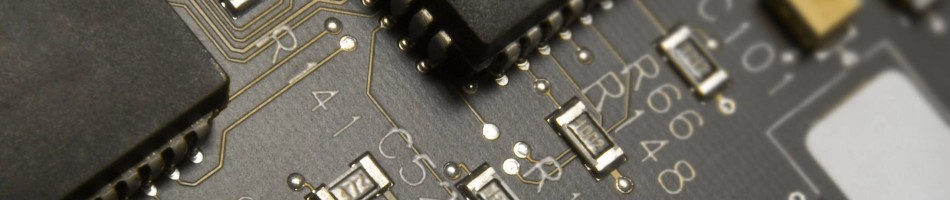
Hi everyone ! I just come back from holidays and I have received my electronic boards \o/ (made on SeeedStudio) 

I also received some cables and the new speakers. I hope I will have time this week to solder the boards.

There are some problems with the top Silkscreen (some letters are missing) but the tracks are good and the quality is also very good. I think the problem comes from the gerber export which gone wrong at some point…


Animabot Rev2 – Electronic Integration

Posted by Emmanuel Sichet on 26/07/2014
Posted in: Animabot Rev2. Tagged: Animabot, electronic, hexapod, raspberry pi, Solidworks. 1 Comment

Hey,

The Raspberry is finally installed ! I just bought the model B+ because it has 4 USB ports, and as I will need 2 for the Wifi and the Webcam, I needed 2 more for the keyboard and mousse for programming the PI 🙂

The model B+ has also 4 mounting holes, which is perfect pour the fixations and it consumes less than the previous model (around 150mA). However I will need to replace the USB and Ethernet connectors which don’t fit in the hood by pin row connectors 😉

I also mounted the mini USB of the STM32 on the top, which is much more easier for programming…

Now I can continue with the final step : The head

Cut view
Cut view
Raspberry fixations
Raspberry fixations
Raspberry B+
Raspberry B+
Raspberry B+
Raspberry B+
Exhaust Hood
Exhaust Hood


Animabot Rev2 – Electronic Integration

Posted by Emmanuel Sichet on 09/07/2014
Posted in: Animabot Rev2. Tagged: Animabot, CNC machine, electronic, hexapod, Solidworks. Leave a comment

Hello 🙂

I finally finished the integration of the boards inside the body ! It took a little more time than I thought but I wanted the most reliable solution.

For the fixation I will use a carbon fiber support (which I will machine with my CNC). This support will also reinforce the body’s structure 😉 and so far, everything  is fitting well inside so  I hope it will be the same for the head…

However, I still have to integrate the Raspebby Pi, which will be placed above the STM32.

Top view
Top view
Rear view
Rear view
Rear view with STM32
Top view with STM32
Top view with STM32
Side cut view
Side cut view

So, the next step is to put the Pi inside and then begin the head design.

Animabot Rev2 – Electronic Design

Posted by Emmanuel Sichet on 01/07/2014
Posted in: Animabot Rev2. Tagged: Altium Designer, Animabot, electronic, hexapod. Leave a comment

Hey,

I spent the last week on the electronic design. I finished all the boards except the one for the Pi. All the schematics and PCBs are made on Altium Designer.

I also received all the components \o/ so now I can check a last time that  all the footprints are correct.

The next step is to send the gerber files of the boards for manufacturing. I’m hesitating between 2 manufacturers : OSH Park and Seeed Studio PCB. I think I will go with OSH Park (previously Batch PCB) because they have a better quality even if they are a bit more expensive than Seeed Studio PCB.

STM32_Adapter
STM32_Adapter
Led_Driver
Led_Driver
Power_Board
Power_Board
Li-Ion_Charger
Li-Ion_Charger


Now I have the boards, I can continue the work on the integration of the boards into the robot and the design of the head.

Li-Ion charger
Li-Ion charger

Animabot Rev2 – PCB Integration

Posted by Emmanuel Sichet on 11/06/2014
Posted in: Animabot Rev2. Tagged: Altium Designer, Animabot, electronic, hexapod, Solidworks. Leave a comment

Hello all,

I didn’t advanced much on the Solidworks Design because I need the size and shape of the PCBs I have to integrate…

Animabot will be composed of 5 PCBs in addition to the Raspberry Pi and the STM32 :

  1. Power Supply Board
  2. Li-Ion Charger
  3. STM32 Board Adapter
  4. Raspberry Pi Board Adapter
  5. LED

I’m using Altium Designer for the Electronic design, I know that it is a complicated software for the boards I have to do, but I am used to it (I used it previously with my first Hexapod and at my school). For the moment I’m spending a lot of time creating the components and footprints I have… so not very funny…

However, I will create the 4 others PCBs in the next few days to be able to put them into Animabot.

PCB view
PCB view
Top PCB View
Top PCB View
Front IR view
Front IR view

I also put an Infrared sensor on the front of the robot, so he will be able to avoid falling in the stairways or from a table 😉

Animabot Rev2 – Leg Design

Posted by Emmanuel Sichet on 01/06/2014
Posted in: Animabot Rev2. Tagged: Animabot, design, hexapod, Solidworks. Leave a comment

Hello 🙂

I finally finished the legs \o/

Front View
Front View
Rear View
Rear View
Left Side View
Left Side View
Top View
Top View
Zoom leg
Zoom leg

Now the legs are done,  I can concentrate on the integration of electronic boards inside the body and the design of the head which will integrate :

  • Camera
  • Night Vision Led
  • Speaker


I also made a special shape for the DC IN connector and the 2 interrupters. I decided to use 2 interrupters in order to be able to disconnect completely the battery from all the electronic (safety reason) and the other is used to power ON the command (Pi and STM32F4)

Zoom power cmd
Zoom power cmd
Zoom In power cmd
Zoom In power cmd

I hope you like it 🙂

Animabot Rev2 – Power supply

Posted by Emmanuel Sichet on 28/05/2014
Posted in: Animabot Rev2. Tagged: Animabot, electronic, hexapod, power supply, power distribution. Leave a comment

I reviewed the power distribution of the robot and the system of 2 batteries… and finally, I’m not satisfied… Having 2 batteries inside take more space, it’s not good for the weight balance and it’s more complicated for the electronic because I would have have to design a board with 2 chargers (LTC4008 and MCP73861) and 2 power monitors (LTC2945). It’s not that complicated but designing a charger board is not obvious and the Electromagnetic compatibility (EMC) would be a nightmare…

So I searched on the Internet for a new battery, and I found this one : Tenergy Li-Ion 18650 11.1V 7800mAh. I could have assembled the battery by myself by buying each element separately which is  much more cheaper, but I have enough work to do… 😉

There are many benefits :

  • Battery’s weight better balanced,
  • Space better distributed,
  • One charger and one power monitor,
  • More capacity than with the 2 others,
  • The battery case is reinforcing the rigidity of the body.

It looks like this once integrated :

New battery integrated
Global view
Global view

I logically changed the charger and chosen a LTC4006 which fit perfectly to my application. Indeed, the LTC4008  doesn’t have a integrated termination charge like the 4006 and the use case of the robot (charging point of view) will be the same as a laptop, so I needed a charger compatible for this utilization.On the datasheet you can find a good application schema, which I have to modify to fit my expectations in order to handle the average 5-6A consumed by the robot…

However, I’m still keeping my precious switching regulators :

  • 1 PTN78060WAH : 5V power supply of the RasPi, the STM32 and the speaker’s amplifier.
  • 1 PTN78060WAH : 3V night vision LED (+ mini fan).
  • 3 PTN78020WAH : 7.4V legs power supply : 1 for each pair of leg  (front +head, middle, rear).

I replaced the PTN04050C by the PTN78060WAH (boost converter), as I won’t use the 3.7V Li-Po battery anymore.

Here is the new electrical architecture :

LTC4006
LTC4006
Electrical Architecture Rev2

Animabot Rev2 – Coxa Design

Posted by Emmanuel Sichet on 26/05/2014
Posted in: Animabot Rev2. Tagged: Animabot, hexapod, robot, robotic, Solidworks. Leave a comment

Hi there !

I finished the coxa articulation, this was a bit more complicated than expected, mostly for the shape design… I created a hole inside the part to be able to pass the cable inside, like this it will not be visible 😉 I didn’t had the time for running some stress tests on this part, so I will do it this week and update this post ^^

I still have to finish the leg. As you can see on the global view of Animabot, the legs are not fitting right on the femur : it is normal, and I will correct that this weekend !

Coxa
Coxa
Coxa Integrated
Coxa Integrated
Global view, body closed

Looks pretty good, no ?

Media Center with Raspberry Pi and OpenElec

Posted by Emmanuel Sichet on 11/05/2014
Posted in: Raspberry Pi. Tagged: home cinema, media center, openelec, raspberry pi, xbmc. 2 Comments

This weekend I have been working on my Media Center with another Pi.

First I installed OpenElec, which is after some tests, much faster than Raspbmc. You can find here how to install it. Then I overclocked it a little to get Xbmc smoother (tutorial here). I choose the Medium overclocking configuration which runs perfectly well and is very stable on my Pi.

Concerning the integration, I wanted it hidden behind the Tv, but it had to look good (no cables everywhere…). I have looked for a long time for a proper case in aluminium but without success… So I finally decided to use an external hard drive case 3,5″‘. The internal dimensions are sufficient for installing the Pi and the cables. The case is also ventilated by may holes on the side panels, so the Pi will not get too hot inside.You can find it on amazon for 22 euros.

For powering all this I used a switch Mausberry Circuits to be able to power ON/OFF the Pi correctly. But the inconvenient is that you have to do it manually  😦

On others occasions, I noticed that the USB port on the Tv is ON when the Tv is ON and OFF when the Tv is in Standby (I have a Samsung UE55F6400). So I came up with the idea of replacing the original interrupter by a relay commanded by the USB port. I simply connected the coil to the 5V of the USB and put a diode (1N4007) to protect the USB Port. On the interrupter circuit I only added a small capacitor (4,7µF) for the relay bounces.

When I power ON the Tv, the Pi starts automatically and when I put the Tv in Standby, the relay goes OFF with the USB port and the script installed on the Pi send the shutdown request.

This works perfectly !!

Power supply with relay
Inside the box
Inside the box
Box installed uncovered
Box installed covered
Installation finished
Globla view
Globla view

Animabot Rev2 – Femur Design

Posted by Emmanuel Sichet on 06/05/2014
Posted in: Animabot Rev2. Tagged: Animabot, design, hexapod, robot, Solidworks. Leave a comment

Hi !

On the last few days I have been finishing the fixation of the servos in the body. I changed the fixing studs for stronger ones. I still have a lot of work to do inside, but first I want to finish the legs.

Empty body
Empty body
Inside body
Inside body
Clear body
Clear body


I have advanced in the femur part, I still don’t know if I will keep this design because the upper part is flat and I’m not sure it combines with the body shape… But however, the servos are fixed inside, the part is relatively compact, and the cables should fit… so it’s not so bad 😉

Femur case outside
Femur case outside
Femur case inside
Femur case inside
Clear femur
Clear femur
Femur lateral cut
Femur lateral cut


I also have temporally integrated this to the body, to see how it looks like and this gives also an idea of the size : Cool isn’t it ?

Leg preview
Leg preview
Leg preview
Leg preview


I think I will have to make the corners of the femur and the body a little bit rounder for the articulations movements… But I will see that with the articulations

The next step is to create the fixations between the body and the femur with a cable passage inside (tricky part…)

Posts navigation

← Older Entries
Newer Entries →
  • Enter your email address to follow this blog and receive notifications of new posts by email ;)

  • License

    Creative Commons License
    Hexapod Robot Animabot created by Emmanuel Sichet is licensed under a Creative Commons Attribution-NonCommercial-NoDerivatives 4.0 International License.

    Creative Commons License
    Animabot & Anim4Bot names created by Emmanuel Sichet are licensed under a Creative Commons Attribution-NonCommercial-NoDerivatives 4.0 International License.

  • Search

  • Linkedin profile

    View Emmanuel Sichet's profile on LinkedIn
  • Archives

    • October 2020 (1)
    • April 2020 (1)
    • March 2020 (1)
    • December 2019 (2)
    • November 2019 (2)
    • September 2019 (1)
    • August 2019 (2)
    • July 2019 (3)
    • June 2019 (1)
    • May 2019 (1)
    • April 2019 (2)
    • February 2019 (1)
    • January 2019 (1)
    • February 2017 (1)
    • September 2016 (1)
    • November 2015 (1)
    • September 2015 (1)
    • August 2015 (1)
    • July 2015 (2)
    • June 2015 (3)
    • May 2015 (2)
    • April 2015 (1)
    • March 2015 (3)
    • February 2015 (1)
    • November 2014 (2)
    • October 2014 (2)
    • August 2014 (1)
    • July 2014 (3)
    • June 2014 (2)
    • May 2014 (4)
    • April 2014 (2)
    • March 2014 (14)
  • Meta

    • Create account
    • Log in
    • Entries feed
    • Comments feed
    • WordPress.com
  • Blog Stats

    • 45,008 hits
Blog at WordPress.com.
Anim4Bot
Blog at WordPress.com.
  • Subscribe Subscribed
    • Anim4Bot
    • Already have a WordPress.com account? Log in now.
    • Anim4Bot
    • Subscribe Subscribed
    • Sign up
    • Log in
    • Report this content
    • View site in Reader
    • Manage subscriptions
    • Collapse this bar
 

Loading Comments...